Pumpkin Playground Guides & Walkthroughs
From first fling to wired machines, powers, elements, vehicles, and all 19 maps in Shiny Burger's sandbox.
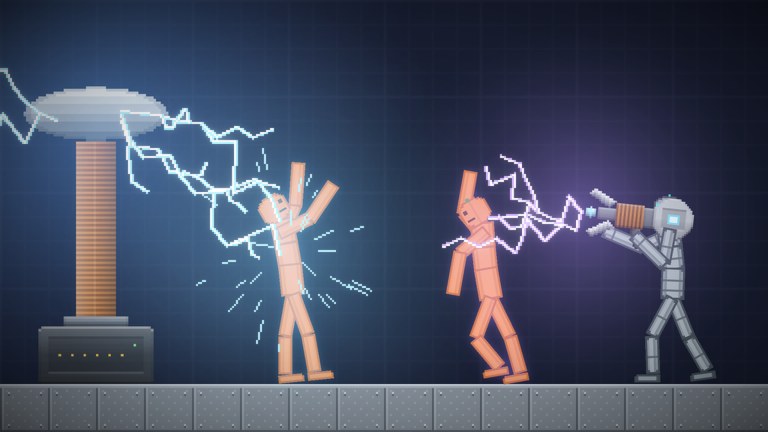
This Guides Hub is the map of every Pumpkin Playground tutorial on the wiki. The game is a free-to-play 2D physics sandbox on Roblox by Shiny Burger (released 2026-10-31, server size 6). You spawn pumpkin people, grab and fling them, arm a 300+ item catalog, trigger eleven powers, wire batteries, motors, and lights, and push real fire, heat, water, acid, and electricity across nineteen maps.
Start with day-one orientation, then branch into controls, powers, building, gear, elements, vehicles, and map choice. Claim free explosives from the Codes Hub when you want Cluster Bomb or Pumpkin Nuke fuel for experiments.
All guides
Getting Started
Your first session checklist: spawn pumpkin people, learn grab/fling, open the catalog, pause and slow-mo safely, pick a calm workshop map, and understand fire, heat, water, acid, and electricity before you escalate. Ideal if you just installed the experience or redeemed WELCOME XP.
Controls
Full input reference for PC plus notes for Mobile, Tablet, and Console. Covers left click grab/fling, F use item, Space pause, G slow motion, T heat view, Z undo, C/V copy/paste, and Tab catalog—the bindings printed in the official game description.
Powers
How the eleven-power kit works in practice, with deep notes on tornado, meteor shower, earthquake, time stop, gravity flip, and UFO, plus how to stage powers with items and maps without losing your build.
Building and Wiring
Wire batteries, motors, and lights into custom machines; combine real fire/heat/water/acid/electricity; save builds; and use copy/paste and undo while you iterate.
Items and Weapons
Overview of the 300+ catalog: guns, swords, katanas, bombs, nukes, cars, and tanks—plus how code rewards like Cluster Bomb and Pumpkin Nuke fit the kit.
Maps Overview
Nineteen stages from quiet workshop floors to lava, sea, and the Moon, including ready-made houses, towers, and bunkers. Pick the right arena for wiring practice versus full chaos.
Elements and Environments
Fire, heat, water, acid, and electricity with heat-view workflows, map pairing, and safe elemental test loops for six-player lobbies.
Vehicles and Builds
Cars, tanks, prefab houses/towers/bunkers, save hygiene, and how to protect creations before powers land.
Suggested learning path
- Read Getting Started and join a low-stress map.
- Pin Controls until pause, slow-mo, heat view, and undo are muscle memory.
- Browse Items and Weapons and redeem codes via How to Redeem Codes.
- Practice Building and Wiring before you invite meteors.
- Study Elements and Environments so fire and fluids are intentional.
- Add Vehicles and Builds, then layer Powers and rotate Maps.
What these guides assume
- You are playing the official place: Pumpkin Playground under the Shiny Burger group.
- Sessions are cooperative chaos with up to six players—agree on pause etiquette before someone time-stops a friend’s project.
- Physics are the point: limbs react independently; pumpkin people stumble, limp, break, and fall apart when you shoot, blast, burn, freeze, or zap them.
Related hubs
- Codes Hub — Active and Check-status promo codes (re-checked mid-November 2026).
- Updates Hub — Patch and content drop tracking after new maps or catalog items.
Use the articles below as living references. When Shiny Burger ships new powers or maps, return here; each child page cross-links its siblings so you can move sideways without bouncing to search. PC nav shows up to eight guide entries and routes overflow to this hub.
Frequently Asked Questions
Quick answers for Pumpkin Playground players.
Which Pumpkin Playground guide should I read first?
Start with Getting Started, then Controls. Redeem codes after you know how to open the catalog and use items with F (or the mobile equivalent).
Do these guides cover PC only?
Core bindings are documented from the PC layout, with Mobile, Tablet, and Console notes on the Controls page. The sandbox itself is free on all of those platforms.
Where do powers and wiring fit in the learning path?
Learn grab, pause, and items first. Wiring teaches durable setups; powers and heavy explosives come after you can undo and copy/paste a build.
Are the guides tied to the November 2026 codes list?
Item examples mention Cluster Bomb and Pumpkin Nuke where relevant, but each guide stands alone if those codes expire. Check the Codes Hub for current strings.